Build Interactive Learning Experiences
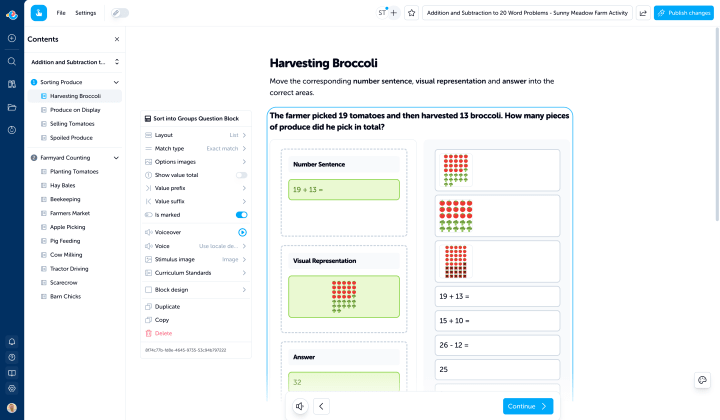
Create multi-page activities that combine text, images, and video with interactive blocks. Number lines, clocks, cloze passages, sorting, word searches, and more, all woven into a guided learning experience learners can complete on any device.

How it works
Three Steps to a Custom Activity
Start with your lesson structure, add interactive blocks, then share with learners. You can teach and assess in the same resource from day one.
- Structure Your LessonStart from scratch or remix an existing activity. Add pages, sections, and instructional content, then shape the sequence around your year level goals.
- Add Interactive BlocksDrop in widgets, question blocks, and puzzles. Learners explore, respond, and practice directly in the flow of your lesson.
- Share with Your ClassPublish and share with a link. Learners can complete the activity on tablets, laptops, Chromebooks, and phones at their own pace.
Teaching and assessing in one resource
Instruction Meets Interaction
A quiz checks what learners know. An activity can teach something new and check understanding as they go. Combine instructional text and images with interactive blocks so learners read a concept, then apply it immediately. Build lessons that move from maths exploration to reflection, aligned to your year level targets.


Interactive blocks
Blocks for Every Lesson
Activities support widgets for exploration, question blocks for assessment, puzzles for engagement, and rich content blocks to guide the lesson narrative.
Widgets (exploration, not auto-marked)
Use manipulatives and visual tools for discovery, modeling, and guided practice.
- Number Line — Drag markers to explore number placement, addition, subtraction, and comparison.
- Clock — Move hands to set and read analog times with linked digital display.
- Angle — Rotate arms to create, measure, and compare angles.
- Number Frame — Tap squares for ten-frame counting and number bonds.
- Multiplication Array — Build and count arrays visually.
- Stacked Equation — Show vertical addition, subtraction, and multiplication.
Question Blocks (auto-marked)
Use fast checks and deeper prompts inside the lesson flow without extra marking.
- Multiple Choice — Classic format with text or image choices.
- True or False — Quick fact-check questions.
- Order — Drag items into the correct sequence.
- Match Up — Connect pairs across two columns.
- Cloze — Fill in missing words from a passage.
- Written Question — Collect open-ended text responses.
Puzzles
Keep engagement high while reinforcing vocabulary and comprehension.
- Word Search — Find hidden words in a letter grid.
- Crossword — Solve clues to complete a crossword puzzle.
- Piece by Piece Pictures — Reveal images as learners progress.
Content Blocks
Add headings, text, images, video, lists, quotes, dividers, and embedded Edzo resources to frame every activity clearly.
Read-along voiceover
Every Word, Read Aloud
Learners can tap text to hear it read aloud with word-by-word highlighting. It supports early readers, EAL/ELL learners, and anyone who benefits from hearing the text while reading.
Built for real classrooms
Designed Around How You Actually Teach
Activities are flexible enough for guided lessons, rotations, independent practice, and homework workflows.
- Multi-Page StructureBreak an activity into pages and sections so learners move one concept at a time at their own pace.
- Curriculum-AlignedTag activities to curriculum standards so teachers can discover and reuse resources by subject and year level.
- Works on Any DeviceNo apps, no plugins. Activities run in modern browsers on tablets, laptops, Chromebooks, and phones.


Print-ready too
Interactive on Screen. Beautiful on Paper.
Every activity can be downloaded as a print-ready PDF with clean layout and name/date fields. Use digital and print together across the same lesson.
Remix anything
Found Something Close? Make It Yours.
Copy any activity, rearrange pages, swap blocks, add your own content, and save your version. You keep full ownership of what you create and remix.
Trending Activities
Need assessment only?
Use Quiz Editor for Focused Checks
When you only need assessment, Quiz Editor gives streamlined workflows with five core question types and fast assign-and-mark cycles.
Frequently asked questions
Everything teachers ask before building their first activity.
Create your first activity today
Sign up free and build an interactive learning experience for your class in minutes.